

Here’s the pattern almost every team falls into with Instagram automation tools: you adopt one to fix the most urgent problem, then a second for the next one, and by the end of the first year you’re running three or four disconnected apps, moving data between them by hand, and spending more time managing the stack than using it.
That’s not a sign you picked up the wrong tool. It’s a sign you’re treating Instagram automation as one product category when it’s actually five separate workflow problems, each with its own tools and its own tradeoffs. As of July 2026, Instagram has grown to 3 billion monthly active users, according to a September 2025 announcement from Meta CEO Mark Zuckerberg, which means the tooling problem isn’t shrinking. It’s compounding, because every team managing that kind of scale runs into the same five-layer wall eventually.
This guide maps those five layers, shows you which ones your team actually needs, and lays out where the available tools, SocialPilot included, sit on that map. We’ve been direct about where SocialPilot fits and where it doesn’t, because the most useful thing we can do is help you build the right setup, not the one that mentions us the most.
The Five Layers of Instagram Automation
Picture your team’s app dock right now. A scheduler. A DM bot somebody signed up for lunch six months ago. Maybe a spreadsheet built to fake the analytics dashboard Instagram won’t hand you. None of them talk to each other, and you’re the one stitching them together every Monday morning.
That’s not bad luck. That’s what happens when you shop for tools before you know what you’re actually solving for.
Instagram automation isn’t one thing you buy. It’s five separate jobs, and most teams only need two or three of them done well. The trick isn’t finding the tool that does the most. It’s knowing which of these five jobs is actually yours, so you stop collecting apps that pile up instead of fitting together.
How the Layers Actually Connect
These five layers aren’t a menu you pick from. They’re a chain, and each link leans on the one before it.
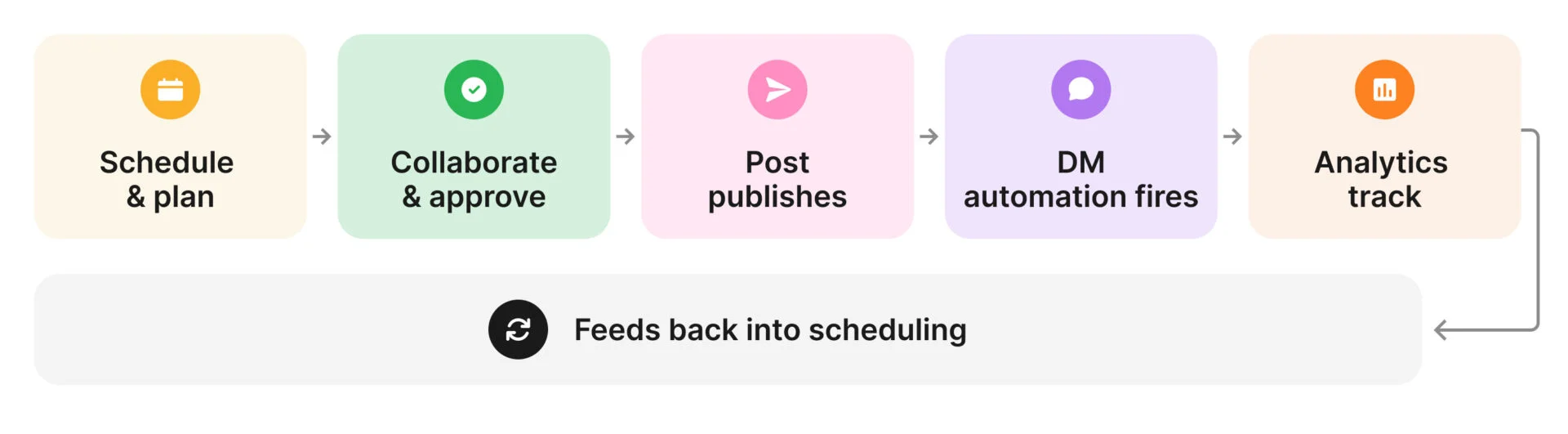
One layer sits outside that chain entirely: multi-account management. It doesn’t add a step, it multiplies every step above across every client account you run, all at once, from one login.
1. Content Scheduling and Calendar Management
The foundation layer.
Batch content once, set it loose, and stop building your mornings around hitting post at 9am. Every other layer assumes this one’s handled, skip it and you’ll burn all your energy on logistics instead of strategy.
Instagram treats formats differently: images and carousels auto-publish, Reels auto-publish for Business/Creator accounts, Stories only get a push reminder, you publish those yourself. If frequency matters more than exact timing, a queue-based tool works; if you’re coordinating campaign dates or client signoffs, you need a visual calendar.
Without this layer: Logging in daily to hit post, no visibility into what’s scheduled for any client.
The signal: A missed post would genuinely hurt you.
2. Team Collaboration and Approval Workflows
The coordination layer.
The moment you’re making content for someone else, this becomes the layer that eats your week. Approvals are a relay: creator, internal reviewer (catches tone, off-brand issues), client (checks “does this sound like us”), publisher. Blur those jobs over email and neither gets done well.
A team running fifteen accounts at two revision rounds per post, 3.2 days per round, is juggling roughly 30 half-finished conversations at once.
| Approval route | Average approval time per post |
| Through external channels (email, Slack, Google Docs) | 3.2 days |
| Through an in-tool workflow | 1.1 days |
The signal: Email telephone has ever delayed a post.
3. DM and Comment Automation
The conversion layer.
“Comment GUIDE” works because Meta opened its Messenger API to third-party developers starting June 2021, before that, automated DMs only fired after a user messaged first. Now a single comment can trigger one.
Four triggers cover most of it: comment triggers (keyword → DM, for lead capture), Story reply triggers (continues a Story conversation), keyword DMs (FAQs), welcome messages (onboarding, fires on follow).
Without this layer: You’re the DM bot at 11pm, typing the same three sentences to strangers.
The signal: People already comment a keyword or DM you, and a human still answers by hand.
4. Analytics and Reporting
The measurement layer.
Instagram’s native analytics work for one account, viewed by one person, and go nowhere without manual copy-pasting. Reach tells you who saw it, engagement tells you if they cared, only content performance tells you what to change next week.
Clients want growth and outcomes (follower trend, clicks, saves); strategists want the messier breakdown (which format or posting time is outperforming). Hand either the wrong view and you’ve satisfied nobody. The fastest-improving teams run a 20-minute gut check before every scheduling session instead of a monthly audit.
Without this layer: Screenshotting Insights for reports, no cross-account visibility.
The signal: You report to anyone besides yourself, or wish Instagram let you compare accounts side by side.
5. Multi-Account and Multi-Platform Management
The scale layer.
The value isn’t several accounts in one dashboard, it’s workspace structure: accounts split by client, team members scoped correctly, clients seeing only their own workspace. Without that, you’ve just moved the chaos into one window instead of five.
Teams feel this violently at client eight, when switching logins starts eating as many hours as the content itself. An agency running 20 clients by hand pays the same fixed cost per client every time; on a real platform, client eleven costs almost nothing extra.
Without this layer: Separate logins, no unified view, inconsistent access, no central reporting.
The signal: Past three accounts; coordination overhead stops being a minor annoyance, and only tooling fixes it.
Which Layers Does Your Team Need?
Essential means this layer is a baseline requirement. Optional means it depends on your strategy. Not needed means the layer adds little value at this stage.
| Team type | Scheduling | Collaboration | DM | Analytics | Multi-account |
| Solo creator, one account | Essential | Not needed | Optional | Not needed | Not needed |
| In-house team, one brand | Essential | Essential | Optional | Essential | Not needed |
| Agency, under 10 clients | Essential | Essential | Optional | Essential | Essential |
| Agency, 10+ clients | Essential | Essential | Optional | Essential | Essential |
| E-commerce brand with DM strategy | Essential | Essential | Essential | Essential | Optional |
| Enterprise in-house team | Essential | Essential | Optional | Essential | Not needed |
Where SocialPilot Fits in This Picture
SocialPilot is a scheduling platform built for agencies and teams managing multiple accounts. It covers four of the five layers above in a connected workflow. Here’s which four, how each one works in practice, and where the gap is. We’ve also included a detailed breakdown of how the DM layer integrates via a paired tool.
Layers Covered
- Scheduling
- Collaboration & Approvals
- Analytics & Reporting
- Multi-Account Management
- DM Automation (via integrations)
The Four Layers as One Connected Workflow
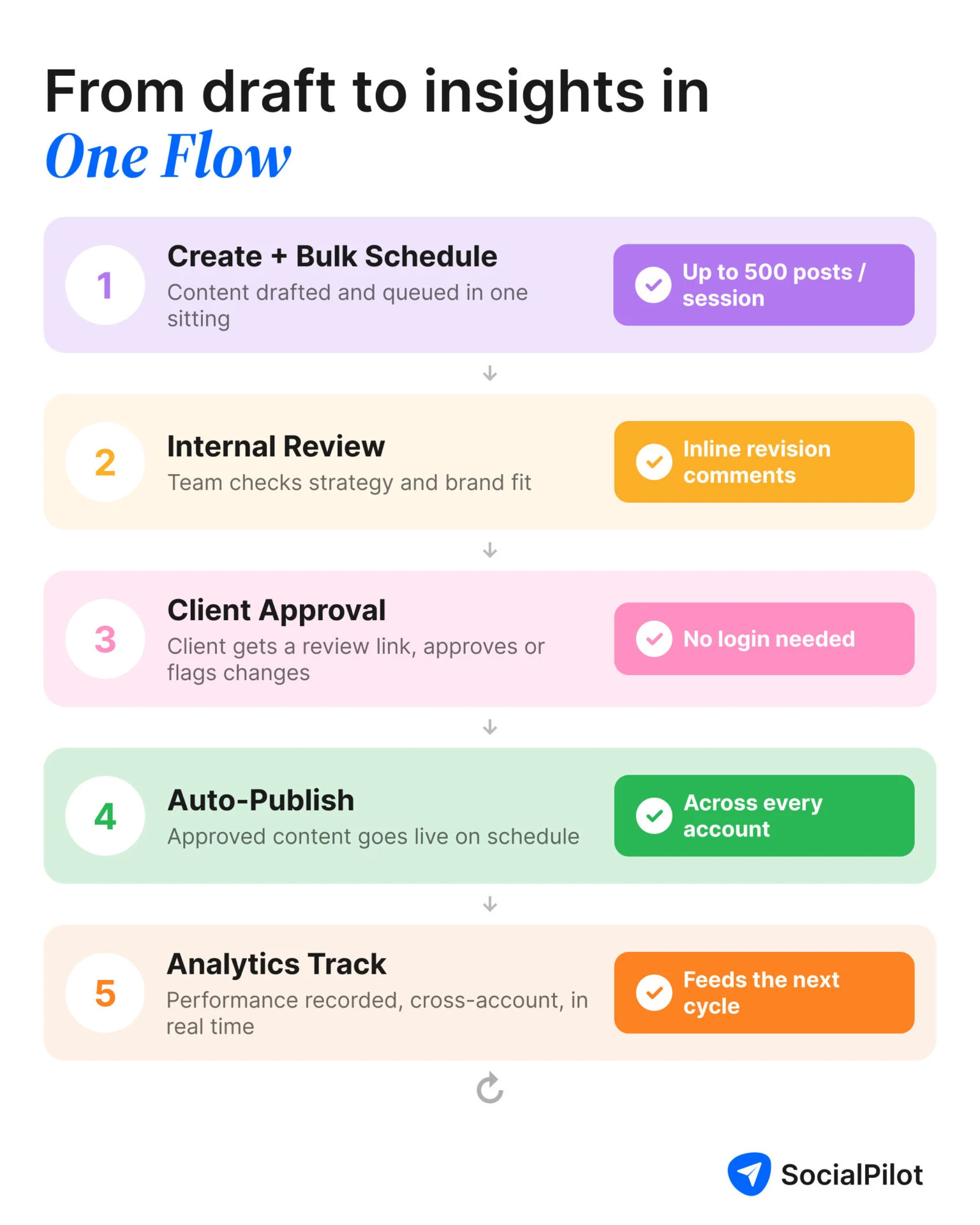
The four layers SocialPilot covers are designed to run as a connected sequence, not as independent features. Output from each stage feeds directly into the next, without manual hand-offs, file exports, or context switching between tools.
Scheduling and Calendar Management
Bulk scheduling handles up to 500 posts per session via upload, CSV, or RSS. Covers images, carousels (10 slides), video/Reels, and Stories (reminder-based, Instagram’s API won’t auto-publish Stories).
The visual calendar shows all scheduled posts, monthly, weekly, daily, shared in real time with team and client.
First comment scheduling auto-posts hashtag blocks, keeping captions clean. AI captions draft from a brief with tone controls. Best-time recommendations use each account’s own data, not industry averages.
- Images/carousels auto-publish via API
- Reels auto-publish for Business/Creator accounts
- Stories stay reminder-based (API constraint, not a platform limit)
~70% less time spent on post logistics vs. manual scheduling.
Team Collaboration and Client Approvals
Four stages, one platform:
- Team member creates and submits for review.
- Internal reviewer checks brand fit, approves or comments inline.
- Client gets a shareable link, approves or notes changes, no account needed.
- Approved content auto-queues for its scheduled time.
Roles: Admin (full access), Manager (content + reporting), Contributor (create/edit only), Client (view/approve their own content only). Each stage emails the next person; version history logs every revision.
A login requirement slows every approval cycle, a link that opens in any browser makes it two clicks. 1.1 days average approval time in-tool, vs. 3.2 days via email.
Analytics and Client Reporting
Account level: follower growth, reach/impressions, engagement by post type, story views, reel plays, profile visits. Post level: reach, engagement, saves, shares, comments per post, with best/worst rankings over any range.
Cross-account view compares the full client roster at once, native Instagram analytics can’t do that.
White-label reports carry the agency’s branding, configure per client to relevant metrics, and deliver automatically on schedule. Brand-awareness clients see growth/reach; content-focused clients see save/share rates by format.
Top agencies run a 20-minute check before each scheduling session, what over/under-performed lately, only possible with analytics in the same workspace as the calendar. 40% less time on monthly client reporting.
Multi-Account and Multi-Platform Management
Workspaces separate accounts by client, own calendar, access, and analytics each. New accounts connect in ~5 minutes via Instagram’s Business API. Permissions are per-workspace: Manager on three, Contributor on five, invisible elsewhere.
Cross-posting sends one core piece of content to multiple accounts with per-account caption tweaks, useful for regional variants. Covers Instagram, Facebook, LinkedIn, X, Pinterest, TikTok, and Google Business Profile in one interface.
500+ posts scheduled in a single bulk session. At three clients, the platform is a marginal edge. At ten, significant. At twenty, structural, client eleven costs almost nothing extra here, versus scaling linearly by hand.
The DM Layer: How the SocialPilot + DM Tool Pairing Works
DM automation isn’t native to SocialPilot, teams pair it with ManyChat or Chatfuel. Correct architecture, not a workaround: SocialPilot owns everything through publication; the DM tool owns everything after engagement. Both run independently on the same posts.
- SocialPilot: creation, scheduling, calendar, review/approval, publication, analytics, white-label reporting, multi-account management.
- ManyChat/Chatfuel: comment-keyword DM triggers, multi-step DM flows, Story reply to automation, lead capture, welcome sequences, FAQ automation, after-hours replies.
In practice: SocialPilot schedules the post; separately, a ManyChat trigger is set (“comment INFO → DM link”). When the post publishes, the trigger fires on its own. SocialPilot tracks post-performance; ManyChat tracks comment-to-DM conversion, separate streams, separate purposes.
The Instagram Automation Tools Landscape
The tools below are organized by which automation layer they primarily cover. Each entry describes what the tool does, what running it as a standalone requires, and how it relates to a complete automation setup.
Covered
Partial
Not Covered
Scheduling Specialists: Layer 1 Tools
Tools built primarily for the foundation layer, content scheduling and calendar management, for individuals and small brand teams.
Clean, minimal scheduling for individuals and small teams.
Coverage
- Scheduling
- Collaboration
- DM
- Analytics
- Multi-account
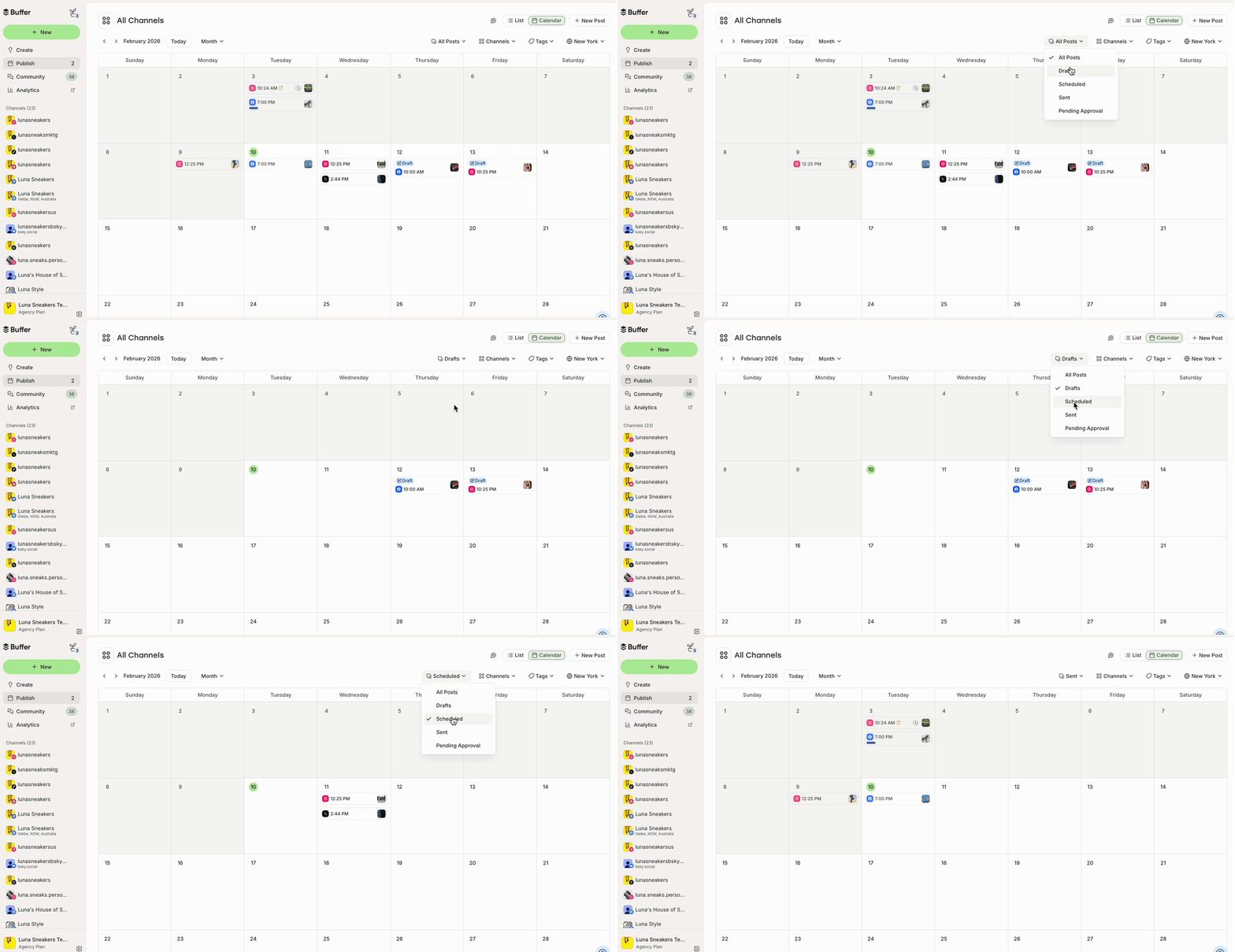
What it actually looks like: Buffer‘s dashboard runs off a left sidebar (Create, Publish, Community, Analytics, Start Page), a shift from its old top nav. The calendar toggles between Week and Month view, supports drag-to-reschedule, and Month view can hold up to 5,000 posts without breaking.
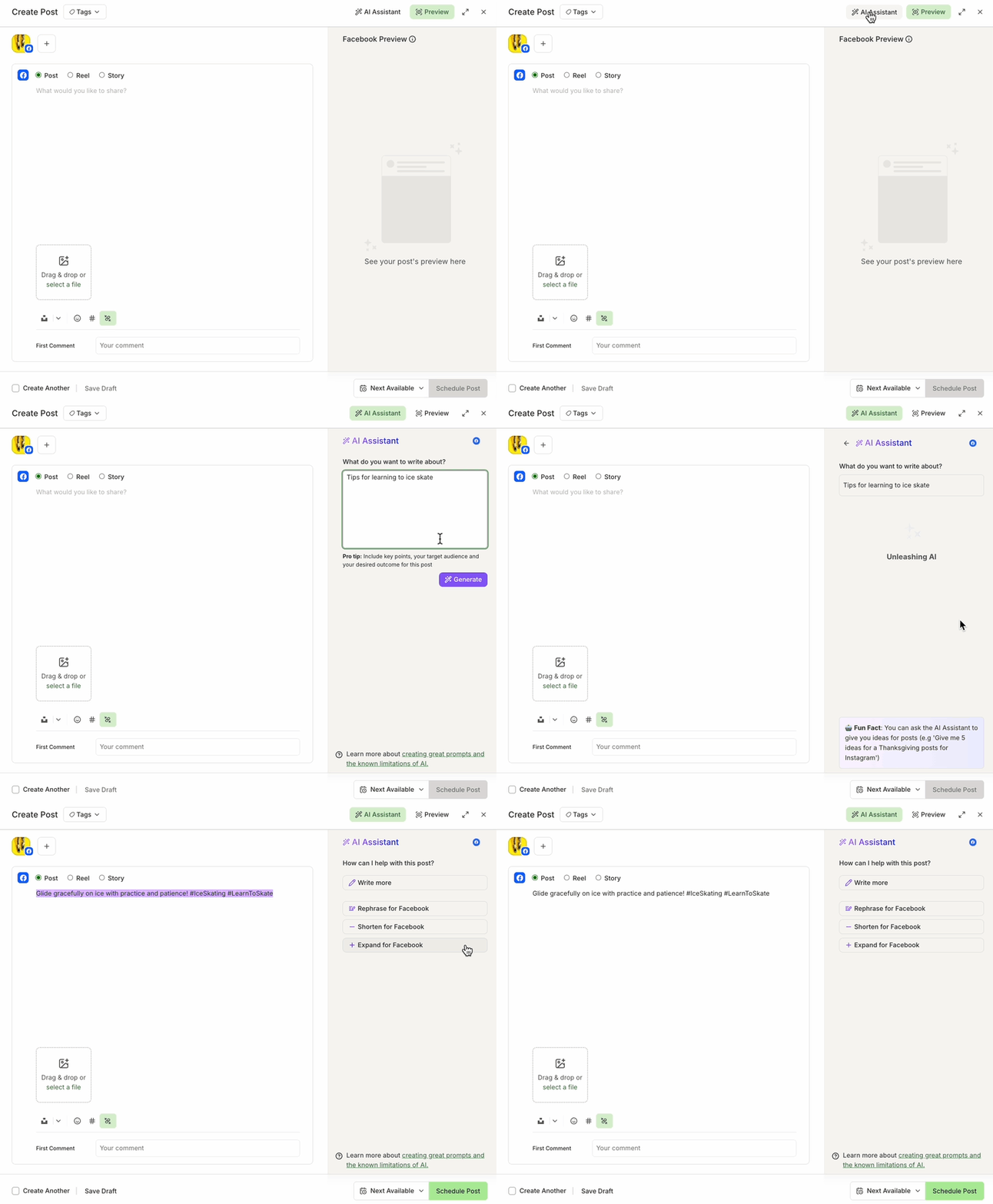
Opening the AI Assistant inside the composer pops into a side panel: type a prompt, hit Generate, then refine with Regenerate, Rephrase, Shorten, or Expand, or switch tone between More Casual and More Formal.
One reviewer flagged a real friction point: connecting Instagram requires it to be linked to a Facebook Page first, “Buffer for some reason requires that the Instagram account is ALSO connected to a Facebook Page.” (Capterra) — Nicole, Writing & Editing
Buffer handles the scheduling layer cleanly and reliably. Its interface is straightforward, setup is fast, and it publishes consistently across Instagram and other platforms without a steep learning curve. For individuals or small in-house teams managing one or two brand accounts, it covers what they need.
Buffer’s paid plans start at $5 per channel per month billed annually (about $6/month billed monthly), on top of a free plan covering up to three connected channels.
What running Buffer standalone requires: if your workflow needs client approval before publishing, you’ll manage that outside Buffer, typically over email or Slack. If you need cross-account analytics, you’ll pull that from Instagram natively. If you manage more than three or four accounts, the absence of multi-account workspace features starts to create friction.
Best for: Solo creators and small in-house teams managing one or two accounts who need reliable scheduling without team features, approval workflows, or agency-scale management.
Scheduling with visual grid planning for product brands.
Coverage
- Scheduling
- Collaboration
- DM
- Analytics
- Multi-account (in pro tier only)
What it actually looks like: The grid preview sits at the bottom of each draft’s edit screen: scheduled and published posts render in full color; drafts render slightly faded, so you can see what’s locked in at a glance.
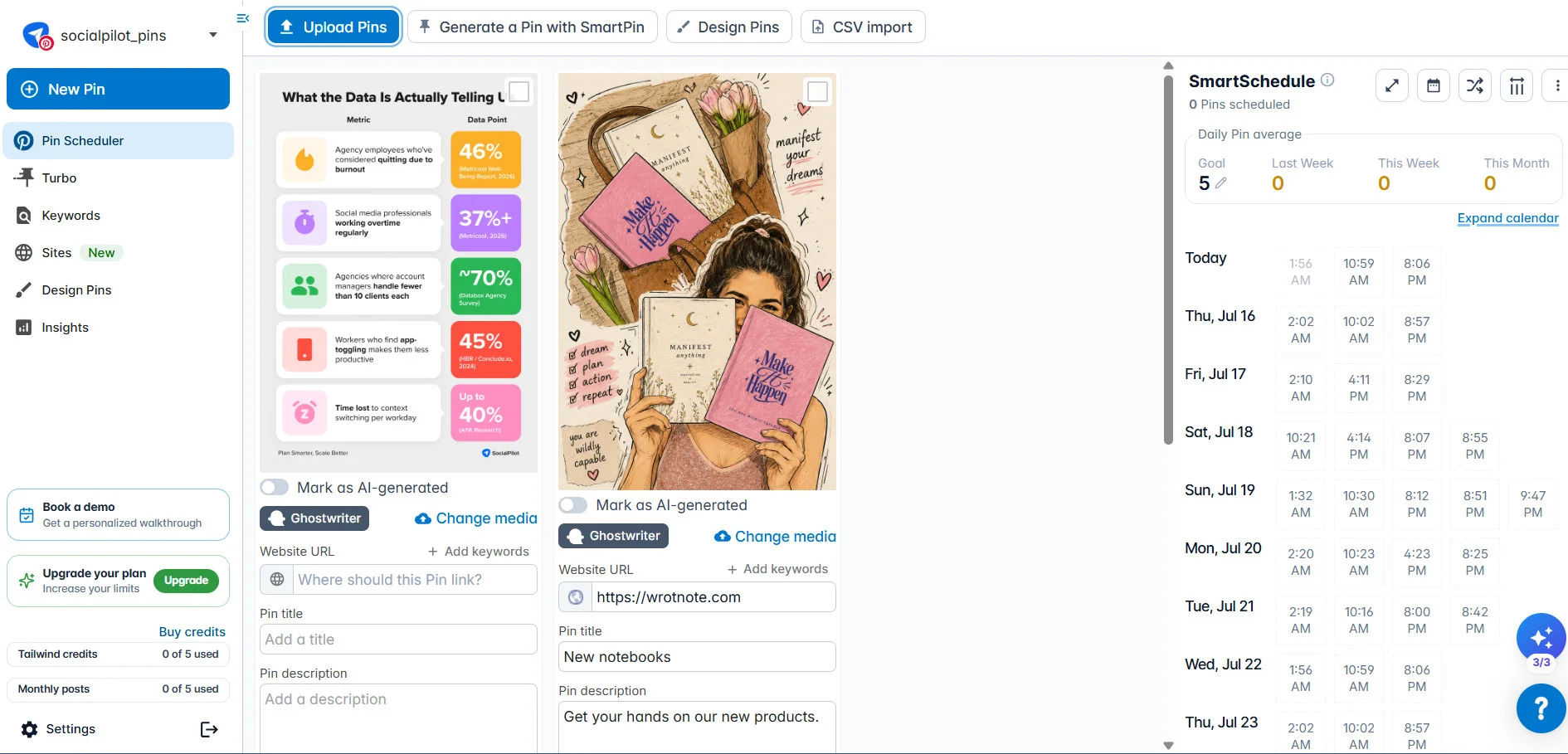
Dragging a tile only reorders which image sits where, not the scheduled time, Tailwind’s own docs are explicit that “your scheduled post times will remain the same, just the post content will shift.” Tailwind Create turns one uploaded photo into hundreds of branded variations across Instagram Feed, Stories, Pinterest Pins, and Facebook.
Not every review is glowing: “After creating the pin, 90% of the time there would be an error, and you’d have to completely start over.” (Capterra) — Brandy V., Social Media Manager, Retail
Tailwind’s differentiated feature is its visual grid planner, a preview of how the Instagram feed will look before posts go live. For product brands and e-commerce companies where the aesthetic of the feed is strategically important, this visual layer has real value. It also includes design tools for creating basic social graphics without leaving the platform.
Tailwind’s Pro plan starts at $29.99/month billed monthly, less with annual billing, and covers up to 150 posts a month across Instagram, Pinterest, and Facebook.
What running Tailwind standalone requires: Tailwind is a scheduling and visual planning tool. Team approvals, multi-account management, and cross-platform analytics beyond basic engagement data are outside its scope. It works well for solo brand managers; it’s not built for the agency use case.
Best for: E-commerce brands and product companies for whom the visual consistency of the Instagram grid is a strategic priority, managed by a small in-house team.
DM and Engagement Automation: Layer 3 Tools
Tools built for the conversion layer, turning comments, story replies, and keyword DMs into automated conversations.
The leading DM automation platform, multi-channel.
Coverage
- Scheduling
- Collaboration
- DM
- Analytics
- Multi-account
What it actually looks like: Automations are built on a visual canvas, drag Message, Condition, Action, and AI blocks onto the map and wire them together, with an Auto-Arrange button to tidy the layout once it gets messy.
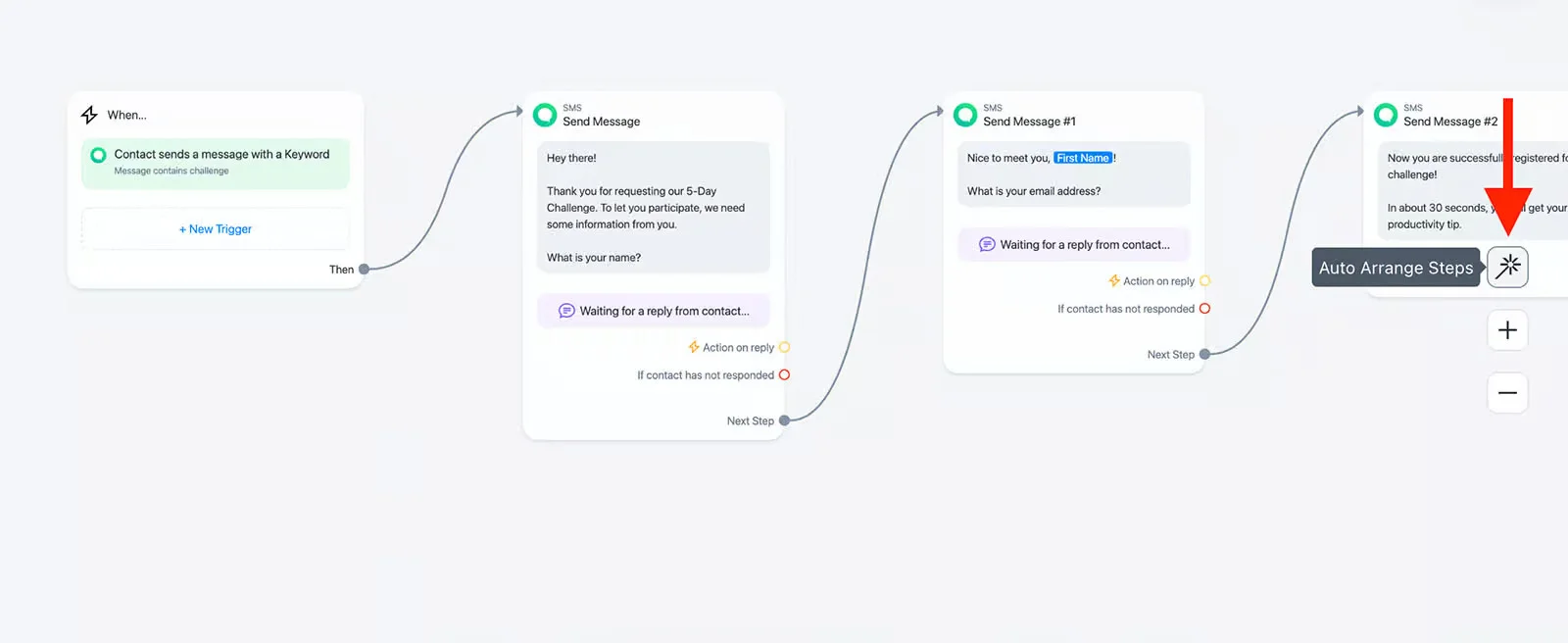
Setting a comment trigger means choosing a match type, Message is (exact), Message contains, Message contains full word, or Message begins with, before the automation goes live via a Set Live toggle.
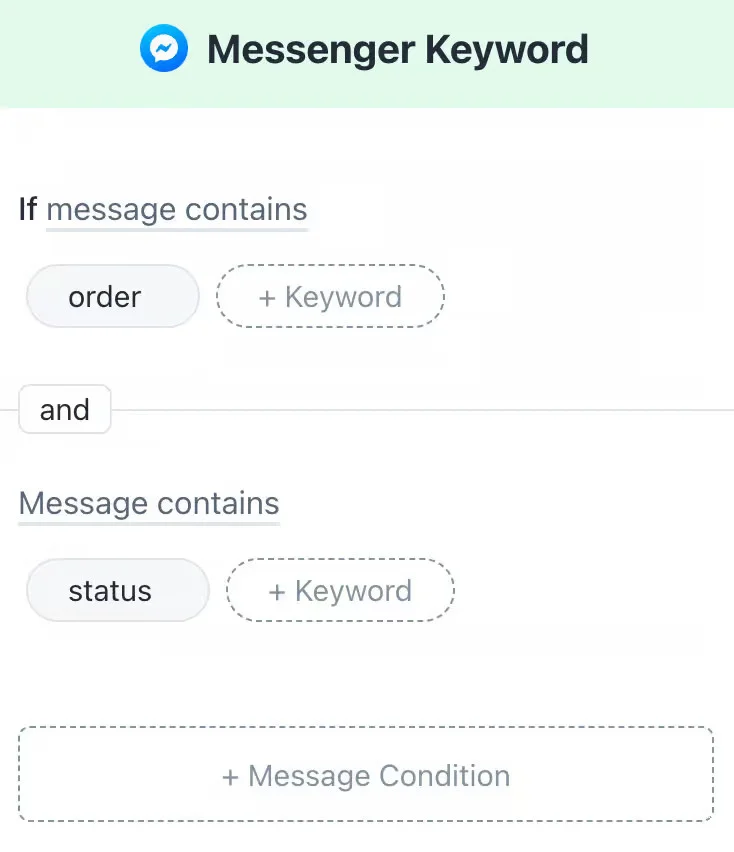
One reviewer summed up the build feel well: “Their Drag, Drop and Connect approach is straightforward and will make you feel like a chatbot genius.” (Capterra) — Yann I., Consultant, Online Media
ManyChat is the most widely adopted tool for Instagram DM automation. Comment-triggered DMs, keyword-activated flows, story reply sequences, link delivery via DM: ManyChat covers this layer across Instagram, Facebook, and WhatsApp. Comment-to-DM triggers typically fire within seconds of a qualifying comment, fast enough to feel like a live reply rather than an automated one.
ManyChat’s paid plans start at approximately $14/month for lower contact tiers under its 2026 pricing structure, scaling up as your active contact list grows.
What running ManyChat standalone requires: ManyChat covers the DM layer only. Content scheduling, the calendar, team approvals, and analytics reporting all happen outside ManyChat. Pairing ManyChat with SocialPilot is a common agency setup, the two tools cover different workflow moments without overlap.
Best for: Brands and creators whose Instagram strategy depends on converting post engagement into DM conversations: lead capture, link delivery, product recommendations, and customer service flows.
Comment-to-DM automation built for creators.
Coverage
- Scheduling
- Collaboration
- DM
- Analytics
- Multi-account
What it actually looks like: Inro‘s product pages describe a 4-step setup, pick the post or Reel, set a keyword or emoji trigger, write the DM plus any follow-up questions, then choose who receives it, marketed as doable “in under 2 minutes.” Every triggered comment gets a required public reply first (something like “Thanks for engaging! Check your DMs”) before the DM sends.
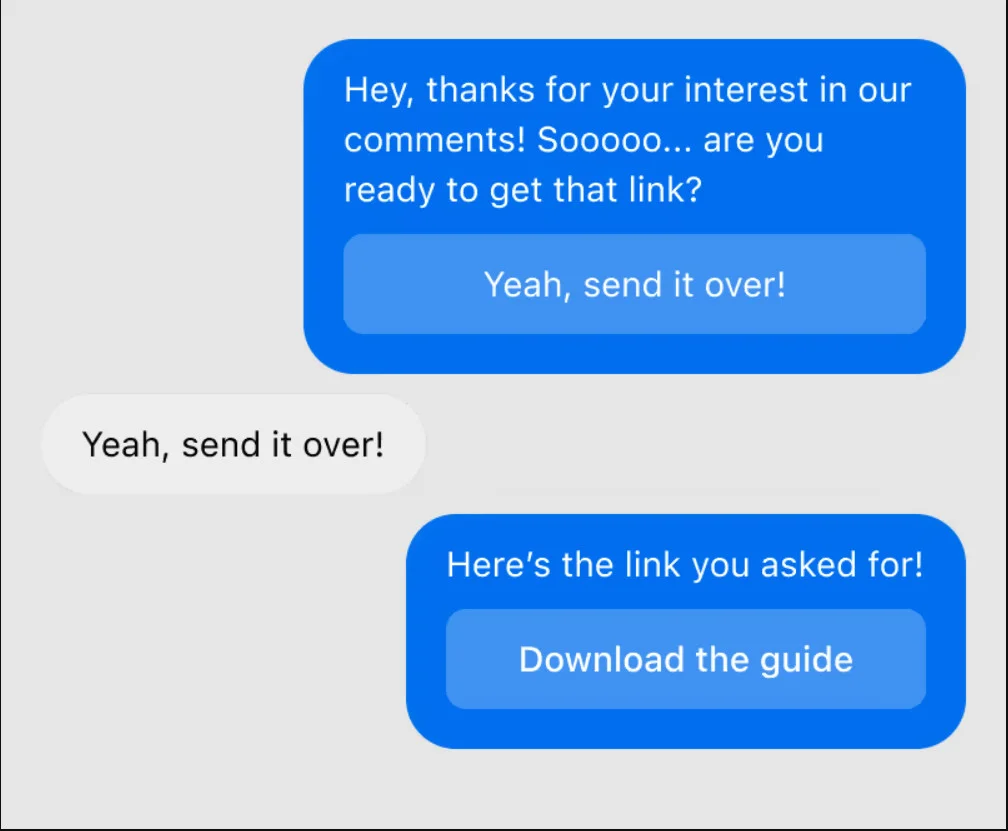
Worth being upfront about: documentation on the actual dashboard layout is thin, this is a newer, smaller product than the others here, and most of what’s public is product-page copy rather than screenshots or in-depth reviews. Product Hunt reviewers rate it 4.9/5 across 16 reviews, praising its “user-friendly interface and streamlined design.” — Product Hunt reviewers
Inro focuses on the creator use case, automating DM responses triggered by post and reel comments, primarily for link delivery and lead capture. Its pricing and interface are calibrated for individual creators rather than agency teams: simpler flows, a lower entry price than ManyChat’s full platform, and less configuration overhead. Inro also offers a free tier for creators just testing the DM-conversion layer before committing to a paid plan.
What running Inro standalone requires: DM automation only, at creator scale. No scheduling, no analytics, no team features. Inro is a single-layer specialist for creators who want the DM conversion layer without the complexity of a multi-channel automation platform.
Best for: Individual creators who post content with a DM-trigger CTA and want that flow automated without adopting a full multi-channel platform.
No-code chatbots for complex Instagram DM flows.
Coverage
- Scheduling
- Collaboration
- DM
- Analytics
- Multi-account
What it actually looks like: Flows are built from Cards (one message or action), stacked into Blocks, linked by small gray Connector circles you drag between them, Chatfuel‘s own docs specifically warn against leaving “dead ends where the conversation suddenly stops.”
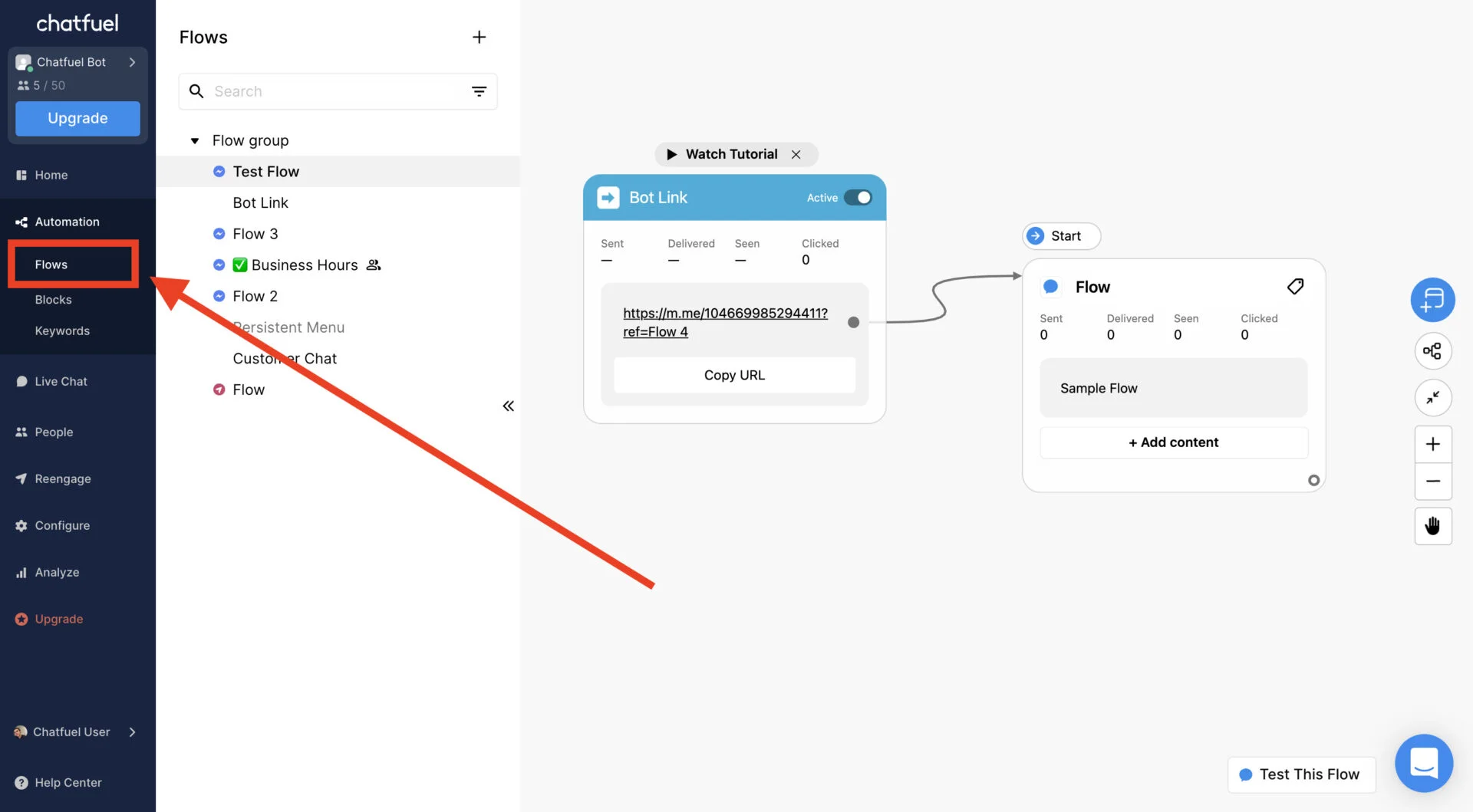
Team handoff runs through a Live Chat tab that sorts conversations into Inbox, Done, and All Conversations folders, restricted to Operator-level users; the bot auto-pauses the moment a human replies.
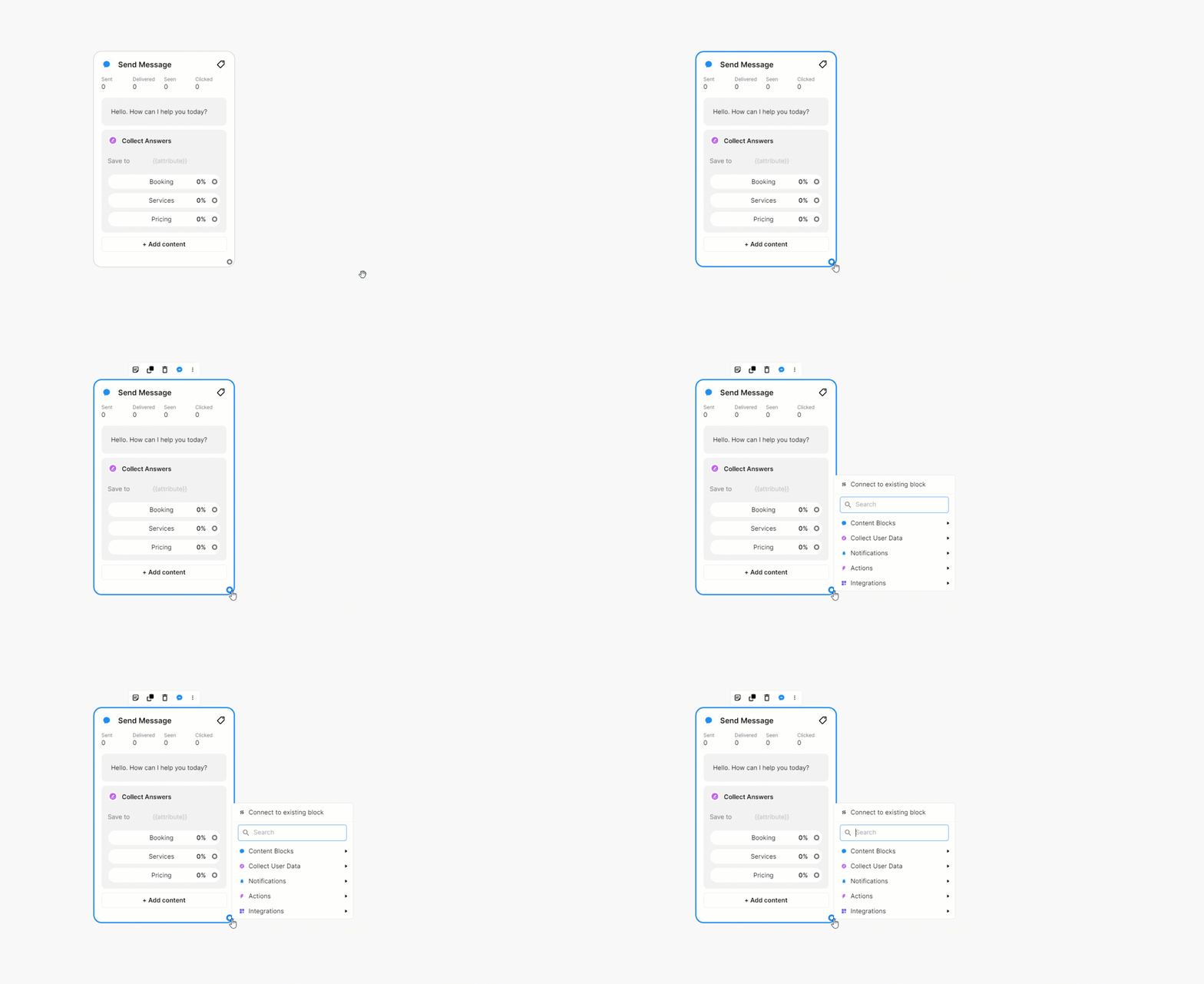
Reviews split on how intuitive this feels: “Drag-and-Drop builder for creating chatbots. No coding or any special skill required, simply click on a button, select the options.” (Capterra), while another reviewer found “Flows and blocks is a bit confusing. It seems like 2 different platforms sometimes.” (G2) — Yann I., Consultant, Online Media
Chatfuel is positioned around no-code chatbot building for Instagram, Facebook, WhatsApp. It handles more complex multi-step DM sequences than ManyChat’s entry tier, making it the fit for e-commerce brands that need branching product recommendation flows or multi-step customer service conversations inside DMs.
Chatfuel’s entry paid plan starts at $49/month, billed monthly.
What running Chatfuel standalone requires: Chatfuel is a DM specialist. Content scheduling and the rest of the workflow stack are outside its scope. E-commerce brands using Chatfuel for complex DM flows typically pair it with a scheduling tool for the content calendar layer.
Best for: E-commerce brands running multi-step DM flows: product finders, customer service sequences, or post-purchase follow-ups, that require more logic than a basic comment-trigger setup.
Full-Suite Platforms: Multiple Layers
Platforms that connect several layers in one workflow, for agencies and larger in-house teams.
Scheduling, approvals, analytics, and multi-account management for agencies.
Coverage
- Scheduling
- Collaboration
- DM
- Analytics
- Multi-account (in pro tier only)
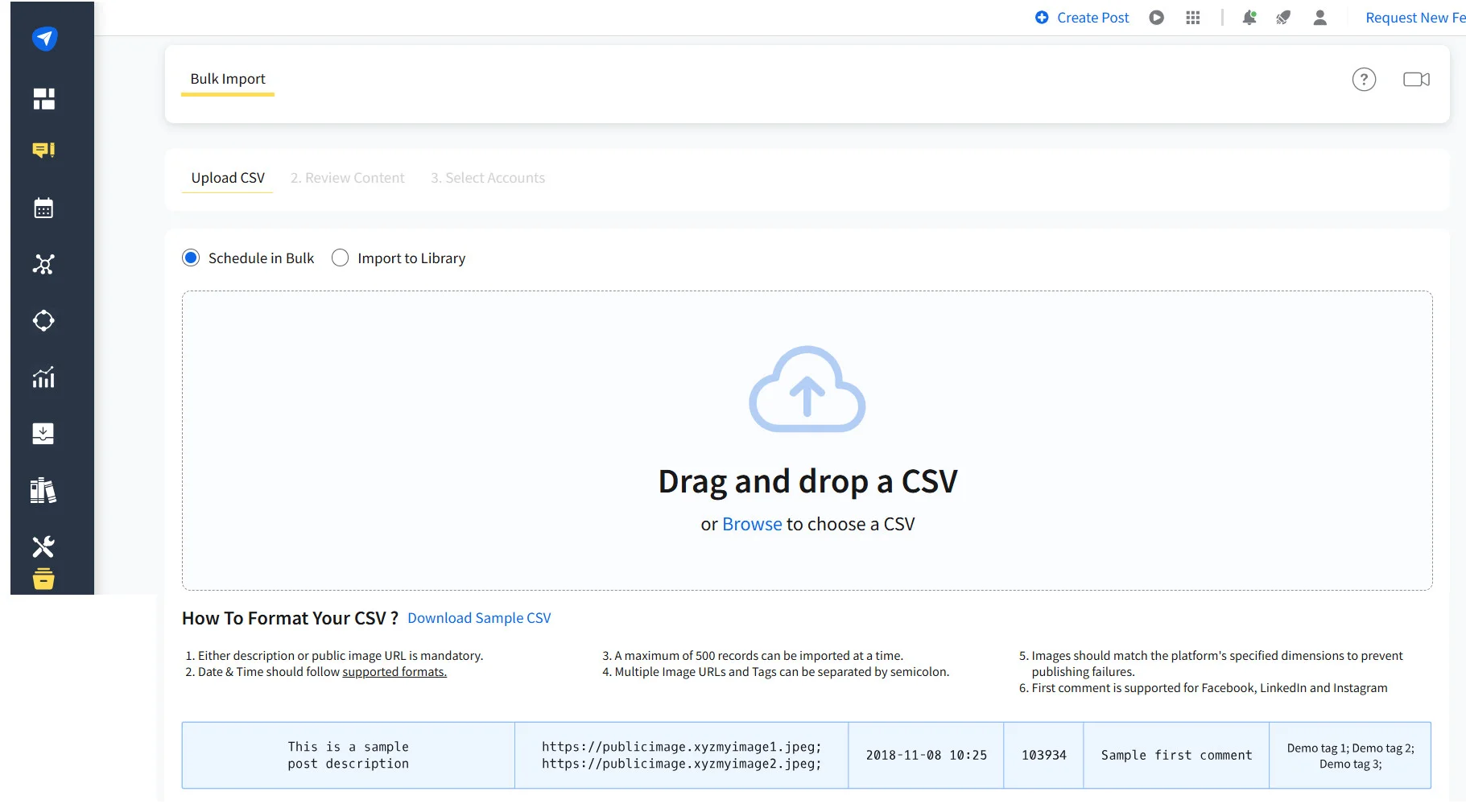
What it actually looks like: Bulk scheduling runs through Posts > Bulk Import: drag a CSV of up to 500 posts into the upload zone, then a row-by-row preview lets you edit each post’s copy, reassign accounts, adjust publish time, or swap images before hitting Schedule All Posts.
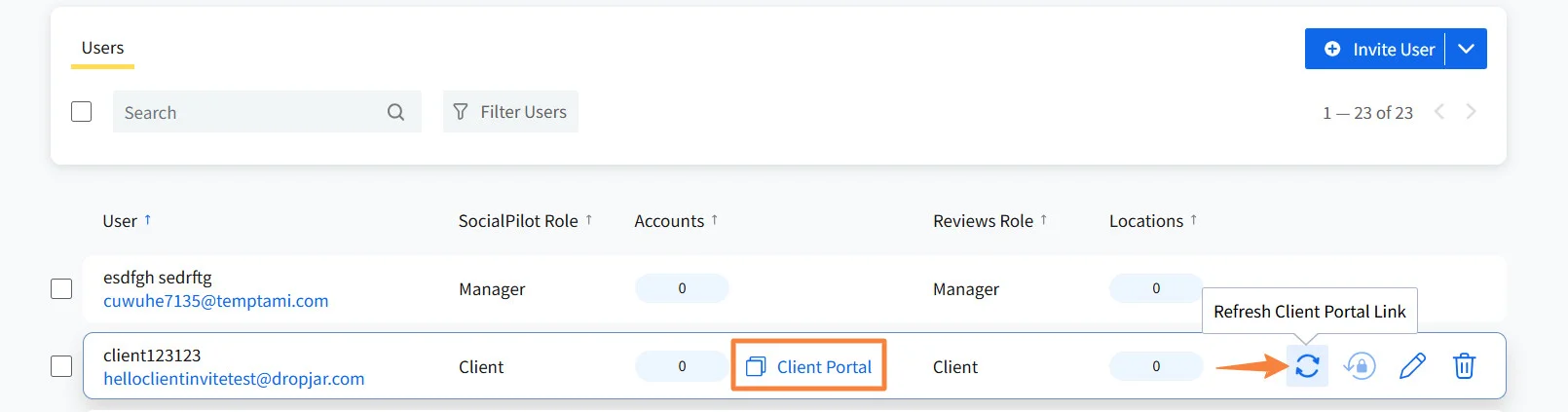
The client-facing side is a no-login shareable link, clients see their calendar, leave comments, then choose Approve to Publish or Send Back.
Feedback isn’t universally smooth: one reviewer described the calendar as unpredictable, “moves posts around of its own accord, even if I move them manually… I have to check the posts, move things, refresh to check it has actually moved them.” Another flagged that bulk posting via CSV only supports text and links, not images or video. (Capterra) — Verified reviewer
SocialPilot is built around the agency workflow: managing content creation, approval, scheduling, and reporting for multiple clients from a single platform. The four layers it covers are designed to connect, so output from one feeds directly into the next rather than requiring manual hand-offs between tools.
The DM layer: SocialPilot doesn’t replace ManyChat or Chatfuel for DM automation. Agencies managing clients with active DM strategies typically run SocialPilot for the scheduling and reporting layers and pair it with a DM specialist for the conversion layer, a common and practical setup with no workflow overlap.
Starting at $30/month, SocialPilot’s pricing is structured around client and account volume, making it accessible for agencies at the point they’re scaling rather than only at enterprise scale.
| Ultimate | Premium | Standard | Essentials |
$170.00/mo$200
Billed annually (Save 15%)
|
$85.00/mo$100
Billed annually (Save 15%)
|
$42.50/mo$50
Billed annually (Save 15%)
|
$25.50/mo$30
Billed annually (Save 15%)
|
|
Streamline Social Media Management
|
|||
Best for: Marketing agencies managing 5+ client accounts, in-house teams / SMBs with content approval requirements, and social media managers who need scheduling, analytics, and reporting connected in one workflow.
Enterprise-tier full-suite platform with social listening.
Coverage
- Scheduling
- Collaboration
- DM
- Analytics
- Multi-account (in pro tier only)
What it actually looks like: The signature Streams view stacks up to 10 columns side by side, mentions, scheduled posts, keyword searches, follower activity, each its own live feed, with a density toggle (Compact/Standard/Comfortable) controlling how many fit on screen.
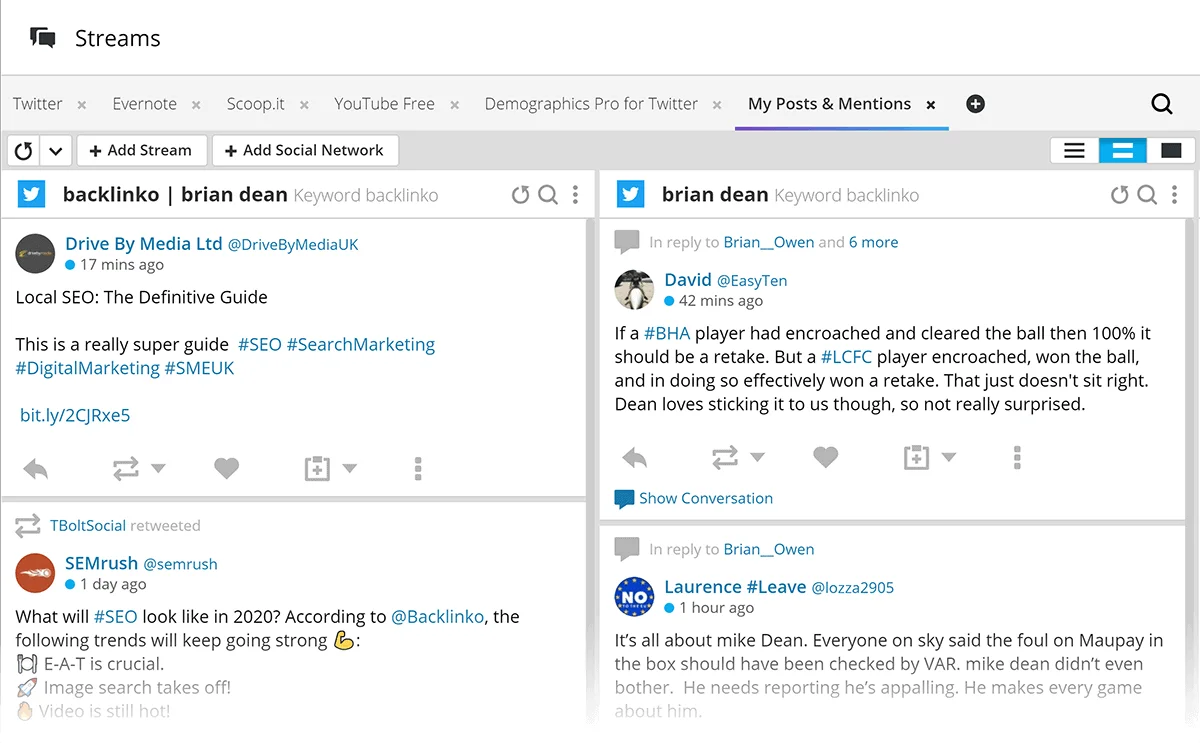
The Planner calendar distinguishes organic from paid content and published from scheduled posts in the same view, with drag-and-drop rescheduling and a 350-post bulk CSV uploader. The Listening dashboard renders sentiment as a color-coded spectrum, green through red, alongside a net-sentiment trend line and a key-drivers word cloud.
Not everyone finds the density a plus: “The interface can feel cluttered at times.” (Capterra) — Duncan C., Digital Solutions Lead
Hootsuite covers the same four layers as SocialPilot, with the addition of social listening and CRM features relevant at enterprise scale. It’s calibrated for large in-house teams with dedicated social departments, brand monitoring requirements, and CRM integration needs.
Hootsuite’s entry-level Standard plan starts at $99/user/month, moving up to $199/user/month on its Professional tier once a team needs workflow automation and unlimited accounts. For agencies managing client accounts on a $30 to $200/month total tooling budget, that per-seat pricing adds up fast across a team. For enterprise brands with a dedicated social budget, the social listening and CRM features justify the cost difference.
Best for: Large enterprise in-house teams with dedicated social media departments, brand monitoring requirements, and social listening or CRM integration needs that justify premium pricing.
Side-by-Side Comparison
Seven tools, one table. Here’s how they stack up across the five layers we just walked through, plus what each one actually costs and who it fits best.
No single tool covers everything on this list, and that’s fine. Match the row that covers your gap, scheduling, approvals, DM automation, analytics, or multi-account, against the accounts you actually run, then check the price and the “best for” column before you commit to anything.
| Attribute | SocialPilot | Buffer | ManyChat | Chatfuel | Hootsuite |
| Category | Full-suite (agency) | Scheduling specialist | DM specialist | DM specialist | Full-suite (enterprise) |
| Scheduling | Full — bulk CSV import up to 500 posts, row-by-row edit before publish | Full — Month view holds up to 5,000 posts, drag-to-reschedule | None | None | Full — Planner separates organic/paid, 350-post bulk CSV uploader |
| Collaboration | Full — no-login client link, Approve to Publish or Send Back | Partial* — team comment/reply tools only, no client approval step; Instagram also requires a linked Facebook Page | None | Full — Live Chat inbox splits into Inbox/Done/All, bot auto-pauses the moment a human replies | Full |
| DM Automation | Partial — pairs with ManyChat/Chatfuel rather than native | None | Full — visual canvas builder, comment triggers fire within seconds of a qualifying comment | Full — handles branching, multi-step flows beyond ManyChat’s entry tier | Partial |
| Analytics | Full — account + post level, cross-account portfolio view, white-label reports | None — pull performance from Instagram natively | Partial | None | Full — Streams view up to 10 columns, sentiment tracking/listening dashboard |
| Multi-Account | Full — per-workspace permissions, client/brand separation | None — friction shows up past 3-4 accounts | None | None | Full |
| Starting Price | $30/mo, scales with client/account volume | $5/channel/mo annual (~$6 monthly); free up to 3 channels | ~$14/mo, scales with active contact list | $49/mo | $99/user/mo (Standard), up to $199/user/mo (Professional) |
| Best For | Agencies running 5+ clients, SMBs that need a formal sign-off step before anything ships | Solo creators or a small in-house team on 1-2 accounts who just need clean, reliable scheduling | Brands/creators converting engagement into DM leads, link delivery, or customer service flows | E-commerce brands running multi-step DM flows, like product finders or post-purchase sequences | Large enterprise teams needing social listening, brand monitoring, and CRM integration alongside scheduling |
Choosing the Right Setup for Your Team
The right Instagram automation setup isn’t the one with the most features. It’s the one that covers the layers your workflow actually needs without creating new coordination overhead between tools. The most common mistake is either over-buying (adopting enterprise tools before the team can use them) or under-buying (running point solutions that grow into a fragmented stack).
| Team type | Recommended setup |
| Solo creator or single-brand team | Scheduling specialist (Buffer or Tailwind) + Inro or ManyChat if your content strategy uses DM triggers. The collaboration and multi-account layers aren’t relevant yet. |
| Agency managing 5+ client accounts | SocialPilot for scheduling, approval, analytics, and multi-account layers. Add ManyChat or Chatfuel if clients require DM automation. Running both in parallel is a common, well-tested setup. |
| E-commerce brand with DM strategy | Solo or small team: scheduling tool + Chatfuel for complex DM flows. Larger team: SocialPilot for scheduling and reporting, Chatfuel or ManyChat for DMs. |
| Enterprise in-house team | If social listening and CRM integration are requirements, an enterprise suite is the right tool. If the need is scheduling and reporting at scale without enterprise pricing, SocialPilot covers that at a fraction of the cost. |
The question to start with isn’t “which tool is best.” It’s “which of the five layers does my team need to cover, and do I need them connected or separate?” That question produces a setup. The setup produces a shortlist. And a shortlist of two or three tools is far easier to evaluate than a generic ranking of ten options.
Building the Setup, Not Just Picking a Tool
The mistake most teams make with Instagram automation isn’t picking the wrong app. It’s shopping for the single best tool instead of mapping which of the five layers (scheduling, collaboration, DM automation, analytics, and multi-account management) their workflow actually needs.
Once you know that, the tool choice gets easy: a solo creator usually needs one or two of these layers, an agency running client accounts typically needs four of five connected in one place, and an e-commerce brand running DM funnels needs a scheduling specialist paired with a DM tool.
If your team is scaling past a handful of client accounts and still stitching together logins, spreadsheets, and email approval chains, start by mapping your own five layers against the table above, then check SocialPilot’s plans and pricing to see where a connected setup would replace what you’re currently piecing together by hand.
Frequently Asked Questions
Is Instagram automation against Instagram's terms of service?
No, not when you use Meta-approved tools that connect through Instagram's official Graph API. What actually violates the terms of service is automated engagement that mimics human behavior without consent, things like auto-liking, auto-following, or DM tools that message people who haven't interacted with you first. Every tool discussed in this guide, SocialPilot, Buffer, Tailwind, ManyChat, Inro, and Chatfuel, operates through the official API rather than bypassing it.
Can Instagram automation get your account banned or suspended?
Only if you're using the wrong kind. Tools that connect through Instagram's official Business API and respect its messaging and rate-limit rules carry low risk. The accounts that get suspended are almost always running browser-based bots or unofficial scrapers that fake human activity outside the API entirely, not accounts using a scheduling or DM platform built on Meta's own developer tools.
What's the difference between a scheduling tool and a DM automation tool?
A scheduling tool, like SocialPilot, Buffer, or Tailwind, handles everything up to and including publishing content: drafting, queuing, approvals, and posting on a calendar. A DM automation tool, like ManyChat, Inro, or Chatfuel, takes over after a post goes live, turning comments, story replies, and keyword DMs into automated conversations. They're built for different moments in the same workflow, which is why many teams run one of each rather than expecting a single tool to do both.
Do I need all five layers of Instagram automation?
Almost never. Solo creators and single-brand teams usually only need scheduling, and maybe DM automation if their content uses a comment-to-DM call to action. Collaboration, analytics, and multi-account management become essential once you're managing content for someone else, like a client or a second brand, not before.
How much do Instagram automation tools cost?
It depends entirely on which layers you need. Scheduling specialists start as low as $5 to $30 a month, DM automation tools run roughly $13 to $50 a month depending on contact volume, and full-suite agency platforms range from $30 a month (SocialPilot) up to several hundred dollars a month per seat at the enterprise tier (Hootsuite).
Can one tool cover everything, from scheduling to DM automation?
Not currently. No single platform natively covers scheduling, approvals, analytics, multi-account management, and DM automation all at once without gaps. Full-suite platforms like SocialPilot and Hootsuite cover four of the five layers well, but all of them pair with a specialist DM tool like ManyChat or Chatfuel for the conversion layer, and that two-tool setup is the industry-standard architecture, not a workaround.
About the Author